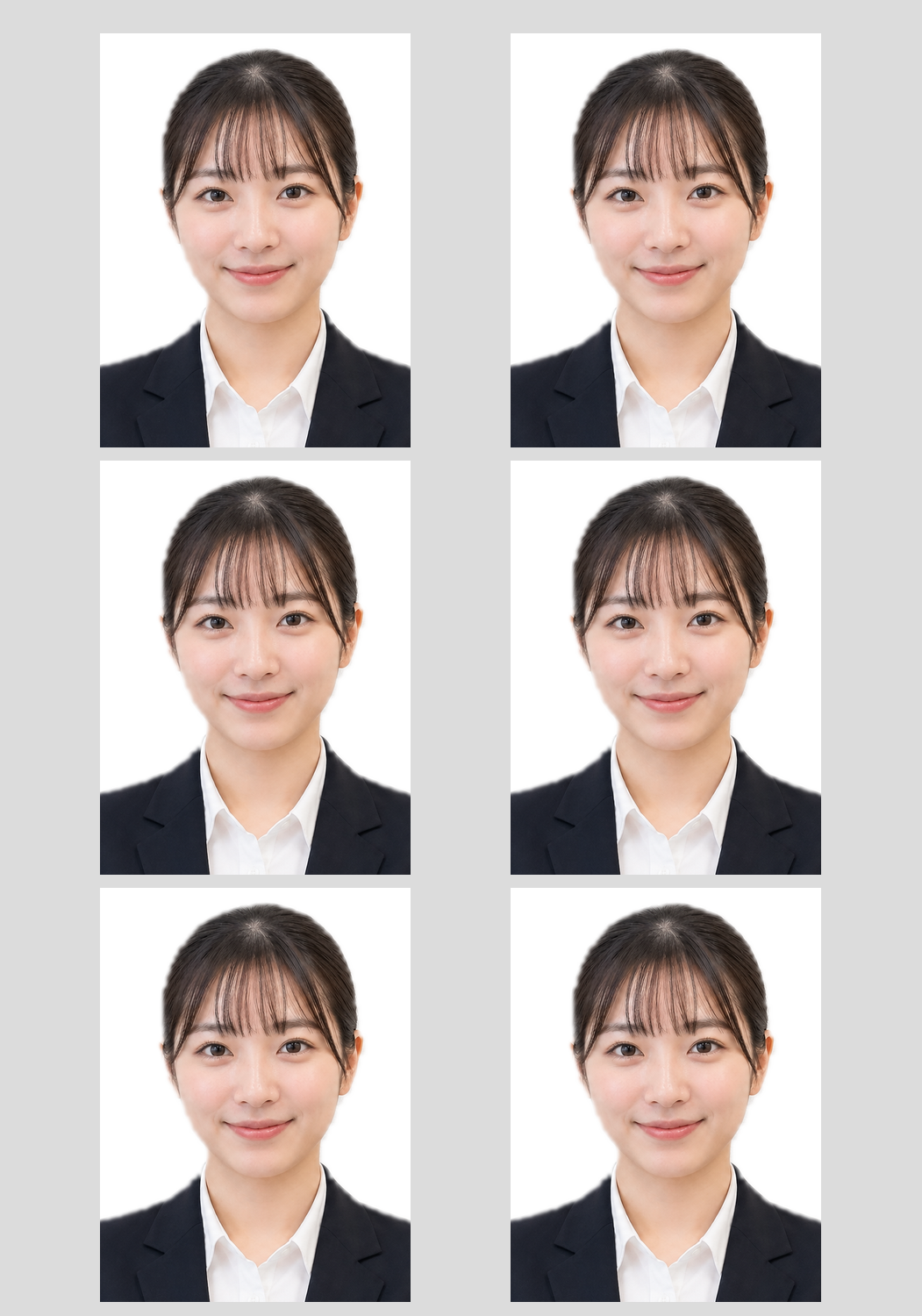
Why make your own US passport photo instead of paying $16?
In the United States, the typical in-store passport photo service at a pharmacy or shipping store costs around $16 for a set of two photos. The photo itself is just a small print — what you are really paying for is the labor of a clerk taking the picture, cropping it, and printing it for you.
If you already have a usable front-facing photo (taken with a phone or camera), you can skip the service fee entirely. This tool takes your photo, crops it to the official 2 x 2 inch size required by the US Department of State, and arranges multiple copies onto a single 4 x 6 inch sheet. You then print that sheet at the same pharmacy kiosk as a regular photo print — which costs about $0.29 to $0.39.
Cost comparison: DIY passport photo vs in-store service
| Method | Typical cost | Photos you get |
|---|---|---|
| In-store passport photo service (CVS, Walgreens, UPS Store, etc.) | ~$16 | 2 photos |
| Standalone passport photo app (paid) | ~$6 – $10 | Digital file + printing cost |
| This tool + pharmacy kiosk 4 x 6 print | ~$0.29 – $0.39 | Up to 6 photos |
The exact kiosk price varies by store and location, but the pattern is consistent across CVS Photo, Walgreens Photo, and Walmart Photo Center: a single 4 x 6 print is cheap, and nothing stops you from putting six 2 x 2 inch photos on that sheet yourself.
US passport photo requirements at a glance
This tool handles the size for you, but the rest of the US State Department rules are up to the photo you upload. The most important requirements:
- Size: exactly 2 x 2 inches (51 x 51 mm). Your head should fill most of the frame, with the top of the head near the top edge.
- Background: plain white or off-white, no shadows, no patterns.
- Expression: neutral face or natural smile, both eyes open, mouth closed.
- Lighting: even lighting across the face, no harsh shadows on the face or background.
- Accessories: no sunglasses, no hats. Regular glasses have been not allowed since 2016 for US passports.
- Recency: the photo must be taken within the last 6 months.
For the full official rules, always check the US State Department passport photo requirements before submitting an application.
Step-by-step: how to print a US passport photo at CVS, Walgreens, or Walmart
- Take a good source photo. Stand about 2 to 3 feet from a plain white wall, face the camera straight on, and have someone else take the photo at eye level. Use daylight from a window if possible. Avoid selfies held at arm's length — they distort the face.
- Open this tool in your browser on any phone or computer. No app install needed.
- Upload the photo and pick White (recommended) as the background. Leave Replace background on if your original background is messy.
- Choose "4 x 6 inch sheet" as the layout. This is the cheapest option because a 4 x 6 print at any pharmacy kiosk costs roughly $0.29 to $0.39, and you get 6 passport photos on that single sheet.
- Click "Generate Print Sheet". The tool produces a PNG file that is already sized for a 4 x 6 inch print, with six 2 x 2 inch passport photos laid out on it.
-
Upload the file to a pharmacy photo service:
- CVS Photo — upload from phone or via the CVS Photo site, pick up at a local CVS.
- Walgreens Photo — upload and select "1 hour" pickup at a nearby Walgreens.
- Walmart Photo — upload and pick up at the Walmart Photo Center.
- Pick up the print (usually ready in under an hour) and cut along the borders with scissors or a paper trimmer. You now have up to 6 passport-size photos.
Clearing up what the tool actually does
"2 x 2 inch" — what does that mean on paper?
A 2 x 2 inch photo is a small square, roughly the size of a sticky note folded in half. Imagine a US quarter coin: four quarters laid out in a 2-by-2 grid would be almost exactly the size of one passport photo. The tool guarantees this size on the final print, which is why using "Fit" mode on the kiosk matters.
Why one 4 x 6 print holds 6 passport photos
A 4 x 6 inch sheet is exactly 2 photos wide (2 in + 2 in = 4 in) and 3 photos tall (2 in + 2 in + 2 in = 6 in). So the grid is 2 columns × 3 rows = 6 photos. It is a little like cutting a small pizza into 6 equal squares — no space wasted.
What "background replacement" does (and does not) do
If you turn on "Replace background", the tool detects the person in the photo and swaps the original background for a flat color. Think of it like a green-screen effect on TV: the presenter is the same, only the scenery changes. It is not a magic retouching tool — if the original photo has hair blending into a dark background, or strong shadows on the face, those will still show. For the cleanest result, start from a photo taken against a light-colored wall with soft, even lighting.
When to use the US Letter layout instead
Use US Letter (8.5 x 11 inch) only if you are printing at home on a color inkjet or laser printer that uses letter paper. Home-printed passport photos often look worse than a pharmacy kiosk print because home printer paper is usually plain paper, not photo paper. For a real passport application, stick with the 4 x 6 sheet and a pharmacy kiosk — the print quality is significantly better.
Frequently asked questions
Is a 2 x 2 inch photo really the correct size for a US passport?
Yes. The US Department of State requires passport photos to be 2 x 2 inches (51 x 51 mm). This tool outputs photos at exactly that size, provided you print the 4 x 6 sheet in "Fit" mode without cropping.
How much does it cost to print at CVS, Walgreens, or Walmart?
A single 4 x 6 print at a pharmacy or big-box store photo kiosk typically costs about $0.29 to $0.39. Since one sheet contains up to 6 passport photos, the per-photo cost is just a few cents.
Why is this cheaper than the passport photo service at the same store?
The passport photo service bundles the photo shoot, cropping, and printing into one ~$16 package. This workflow skips the service and uses the store only to print your already-prepared file as a regular 4 x 6 photo. You are paying for paper and ink, not for service time.
What background color should I use?
Use White. The US State Department requires a plain white or off-white background. Gray and blue backgrounds are available for non-passport uses such as employee ID photos or some foreign visa applications.
Does this work on my phone?
Yes. The tool runs entirely in your mobile or desktop browser. No app, download, or signup is required. Works on iPhone Safari and Android Chrome.
Will these photos be accepted for an official passport application?
The tool produces photos at the official 2 x 2 inch size with a compliant background option, but acceptance depends on the original photo meeting all State Department rules (head size, neutral expression, even lighting, no glasses, taken within the last 6 months). Review the official US passport photo requirements before submitting.
Can I use this for a driver's license, green card, or visa photo?
Many US documents (green card, some state IDs) also use 2 x 2 inch photos. Foreign visas often require different sizes — check the specific requirement before printing. This tool currently only outputs the 2 x 2 inch US format.
Do the photos I upload get stored anywhere?
The uploaded file is sent to the server only to generate the print sheet and is not kept long-term. For any privacy-sensitive use, review the site's privacy policy.